Token generation with real priorities
Number ranges per service, priority lanes for elderly and differently-abled visitors, and reserved tokens for booked appointments — all visible at a glance.
Visitors see big, readable token displays. Operators get a single screen for call, recall, transfer, and complete. Managers get the numbers that matter, not a wall of vanity charts.
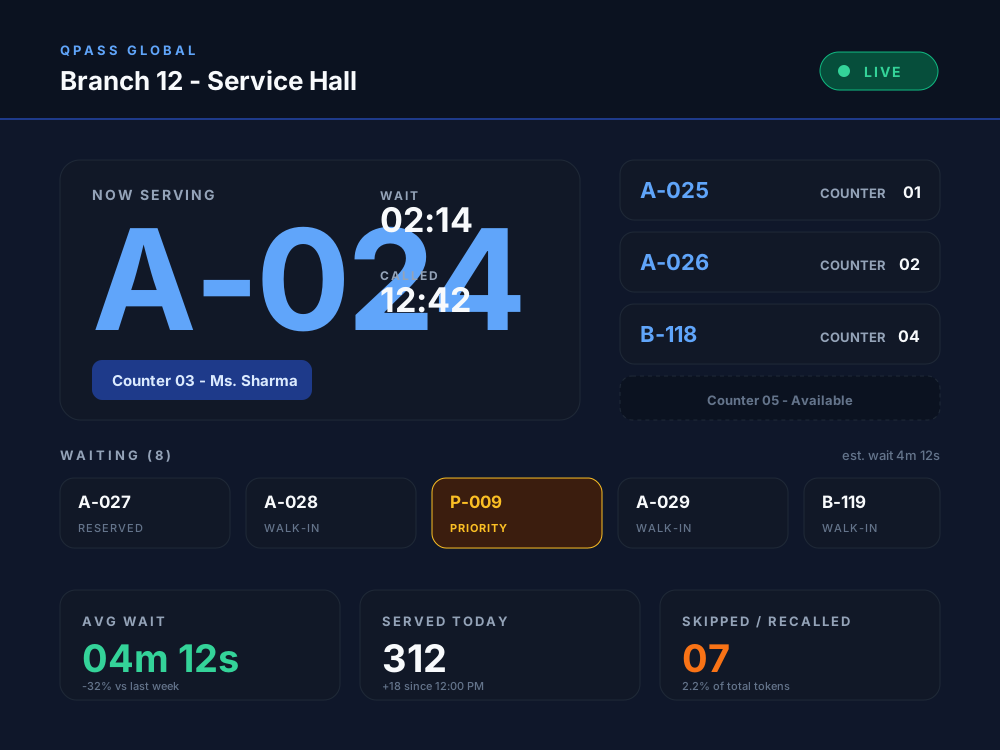
Number ranges per service, priority lanes for elderly and differently-abled visitors, and reserved tokens for booked appointments — all visible at a glance.
Run a main teller counter with two cash sub-counters, or three consult rooms behind a single OPD desk. Routing happens automatically.
Call next, recall, transfer, skip, complete. Keyboard shortcuts for high-volume counters. Errors are reversible with one click.
A single browser tab on a TV becomes a queue display. Configure layouts per location: one TV for the lobby or twelve screens across floors.
When someone misses their call, the operator decides — recall in 60 seconds, skip and move on, or mark complete and serve the next visitor.
Average wait, busiest hour, longest serve, who skipped most. Use it to plan staffing, not just to praise the team on quiet days.
Readable from across the lobby
Token displays are designed for a 20-metre line of sight, not a 24-inch monitor. The current token reads at a glance.
No shouting names
A clear chime when a new token is called. Optional voice announcement. Skipped tokens get a second chance without the receptionist losing their voice.
A waiting list, not a guess
Visitors see how many people are ahead of them and which counter they will likely go to. That alone removes most of the “why are we waiting?” questions.
Why teams pick QPass Global
A 1990s LED token machine still works, but it does not know about branches, sub-counters, priorities, or appointments. QPass Global does, and it stays out of the way the rest of the time.
When someone books a slot online, the token is generated for the right counter automatically. No copy-paste between calendars and a separate display.
Call, recall, transfer, skip, complete. Sub-counters for specialist services. Priority tokens for elderly and differently-abled visitors. The buttons are where operators expect them.
Wait time, serve time, peak hour, busiest counter, and where people abandoned. Numbers you can take into a Monday meeting and act on.
Big, readable displays. Tokens with bilingual labels where needed. SMS and email confirmations that read like a normal message, not a corporate template.
Whether your priority is shortening queues at a single clinic or standardising service across a region, QPass Global gives you appointments and queues in one place so the visitor sees one journey, not two systems patched together.